How To Manage Hosted Tournaments On Tourvex

If you've just hosted your tournament on Tourvex, managing it is the next thing to be on your agenda. As an organizer, managing your event from start to finish is critical. This way, you'll be able to et a smooth and a competitive experience.
Managing tournaments is very easy on our platform. In this guide, we will cover what you need to do. It is very straightforward and also covers all the important details. You don't need to do much because the dashboard to manage tournaments, brackets, pay-outs, etc is self explanatory.
Steps to Manage Hosted Tournaments on Tourvex
From the start to finish, everything you need to do has been explained below and you can also check your dashboard to follow up real quick.
Step 1: Access Your Organizer Dashboard
The first thing you need to do is login to your user dashboard. Then click on My Tournaments. In here you'll find all the tournaments you have organized or organizing as a user.

Step 2: Manage Tournaments
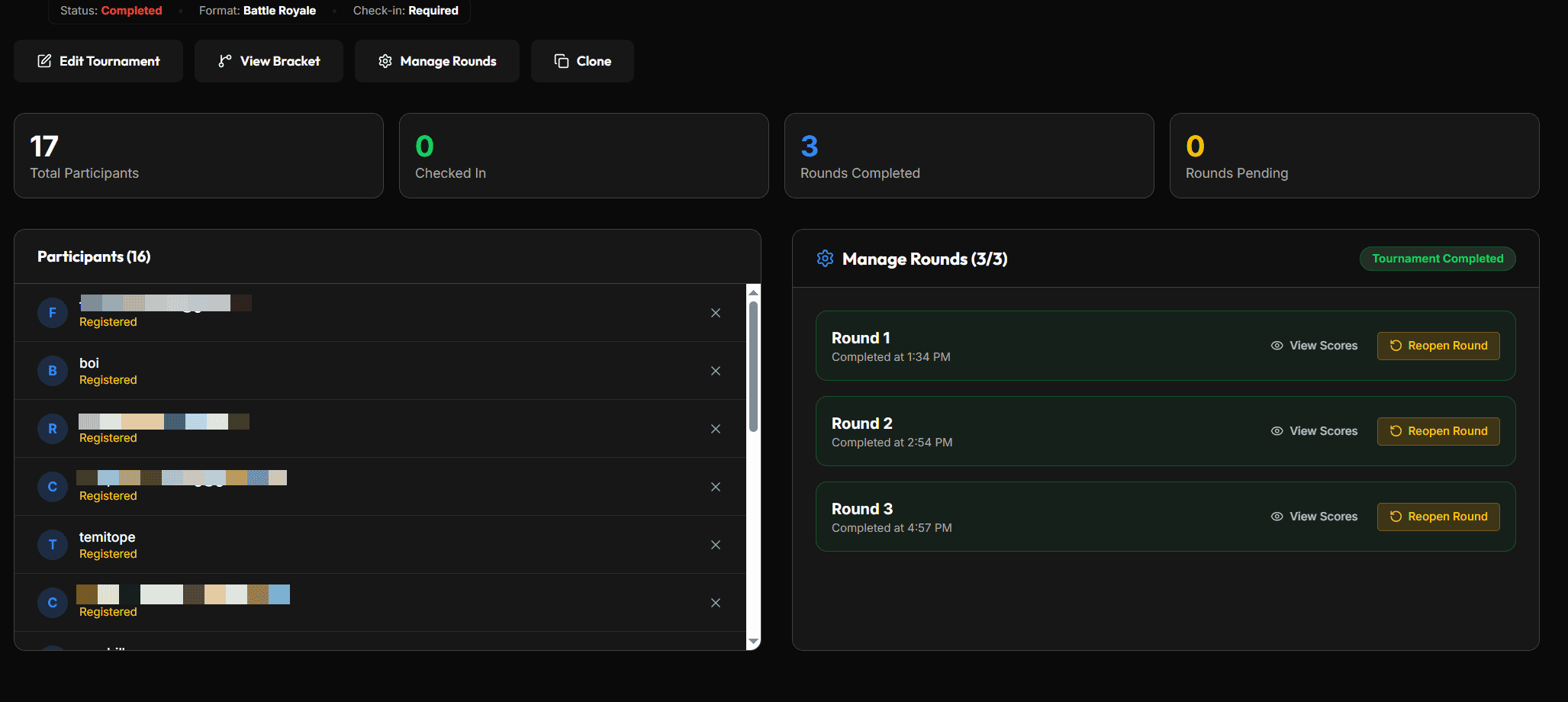
On the My Tournaments page, you'll see the available tournaments organized by you. Click the Manage Button. This will show you all registered users, amount paid per person. You can also see users who have checked in, number of rounds, etc.
Step 3: Manage Rounds/Matches
If for example, you organized a Battle Royale tournament and you have up to 3 rounds or more. Once the first round is about to start. Click on Manage Rounds > Start the first round. Then provide the room ID and password, then save it. An email will be sent automatically to all registered users.
Note: You have to repeat this for all number of rounds till you're done.
Step 4: Verify Results
Once a round is completed. In the Discord or WhatsApp group where you communicate with your participants, tell them to upload results. There's a section to see uploaded results. You can also verify from the match result generated from the room. Enter scores and placements for each user. The system automatically calculates the result for you.
Step 5: Resolve Match Disputes
Keep an eye on the Matches tab for any games flagged as Disputed > click on the disputed match to open the details > review the screenshot evidence uploaded by both players > manually override the score using your organizer controls to advance the correct player.
Step 6: Conclude the Tournament
Monitor the bracket until the final match is played and the winner is decided > ensure all scores are accurately recorded so the tournament status automatically updates to Completed > rest easy knowing the Tourvex platform staff will automatically handle calculating the prize splits and processing the final payouts directly to the winners' wallets.
Final Words
Managing your hosted tournaments on Tourvex Esports Hub is that easy. Everything in the organizer dashboard is really straightforward. However if you need further assistance, you can reach out to us on [email protected] and we will help you manage your tournament from our personal dashboard.
Comments
Leave a Comment
No comments yet. Be the first to comment!